
How do I update the name on Summ reports?

Find out how to change the name shown on your Summ reports for SMSF, company, or trust accounts.

Support
 – 
How do I update the name on Summ reports?

Our customers can link their existing trading accounts with Summ (previously Crypto Tax Calculator) for easy crypto tax reporting and tax minimisation insights. 

Update your Summ name 

To update the name on your tax reports (including for SMSF, company and trust accounts):

1. Click Settings.
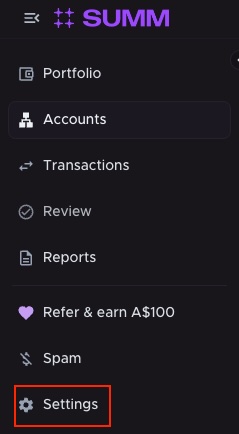
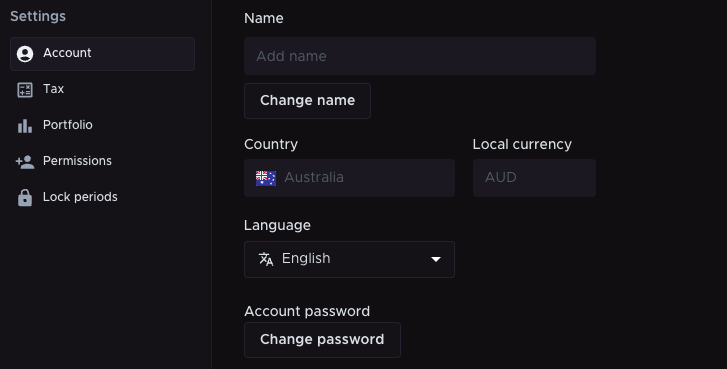
2. Under the Accounts tab, click Change name and enter your chosen name.

3. Click Save.
Connect your trading account with Summ

Our customers receive a 30% discount off their first year with Summ. 

To take advantage of this exclusive deal, available to all new Summ customers:

1. Log in to your bitcoin.com.au account.

2. Navigate to Transactions and click Tax.

3. Click Get started with Summ. Your Summ account will be automatically generated.

bitcoin.com.au website interface with the “TRANSACTIONS” dropdown menu highlighted in the top navigation bar. Below, the “Tax” tab is selected within the “Transactions” section, positioned between “Transaction history” and “Reports.” The site’s logo is visible in the top left corner.

Don’t miss important crypto news in Australia

Sign up to get the latest news about Bitcoin, Ethereum, XRP and all things crypto. You’ll also gain exclusive access to offers on bitcoin.com.au.

Buy crypto in Australia

The easiest way to buy Bitcoin and Crypto

bitcoin.com.au app