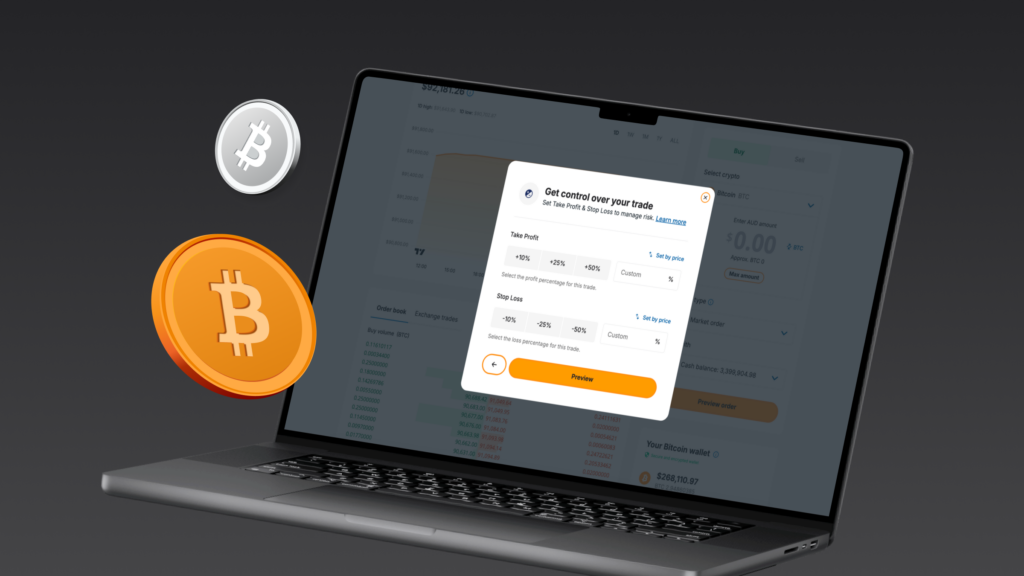
Want to protect a position without watching the screen all day? Take Profit and Stop Loss orders do the work for you. Set your price levels in advance and bitcoin.com.au handles the rest automatically.
This guide covers how both order types work, where to set them across different trade types, and what happens when they trigger.
Set up Take Profit and Stop Loss
Key takeaways
- Take Profit closes your position when the price rises to a target you define. Stop Loss closes it when the price falls to a level you set.
- Both can be set on the same position at the same time. The first to trigger closes the trade and cancels the other.
- Works with market buy orders, limit buy orders, and leveraged positions. Set your target by token price, fiat profit, or fiat loss amount.
- These orders are built to fire at your chosen price, but slippage or sudden price gaps can affect the result in fast-moving markets.
What are Take Profit and Stop Loss orders?
Both are conditional order types that monitor the market on your behalf. You choose a price level; if the market hits it, the order fires and your position closes without you needing to act.
You can run both on the same position at the same time. That gives you a defined exit in either direction: one level captures a potential gain, the other limits a potential loss.
When one side triggers, the other is cancelled. This setup is called a one-cancels-the-other (OCO) order.
- Take Profit closes your position when the market reaches a target price above the current price. It locks in potential gains without you needing to watch the market.
- Stop Loss closes your position when the market falls to a level below the current price. It limits the potential loss.
Using both together means you are never in a position without an exit plan.
Where can you set Take Profit and Stop Loss?
All order types can be managed via the website portal.
You can set or update these orders in three places:
- Leveraged trading: set it when opening a new position or managing an existing one.
- Trade screen (Profit & loss tab): set or update it any time from the Action column.
- After placing a market order: set it when prompted after placing a new order.
In each case, you can define your target by token price or by a fiat amount.
How to set Take Profit or Stop Loss
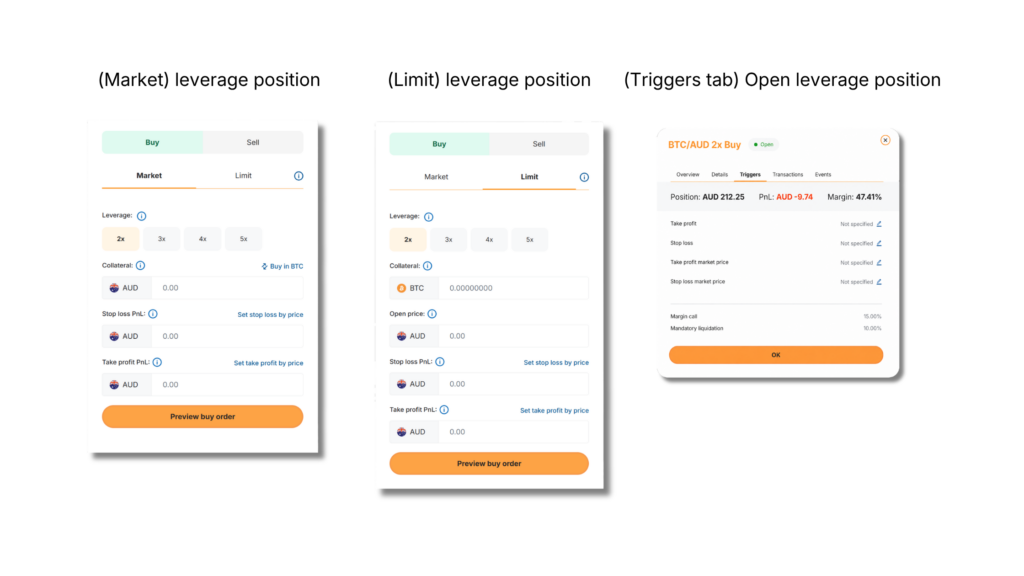
On a leveraged position
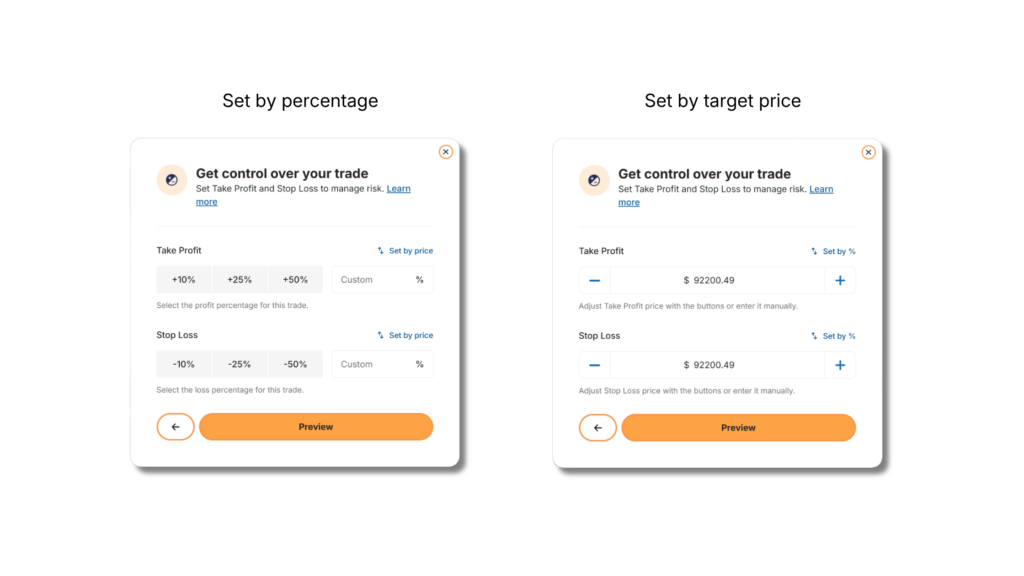
When setting up a new leveraged position, you can define each side by either a target price or a fiat amount.
Once the position is open, you can set both a target price and fiat amount on the same side, giving you more precision over when each order triggers.
- Target price: the market price at which the order will trigger.
- Amount in fiat: the profit or loss amount in fiat at which the order will trigger.
For more on how leveraged trading works, see our leveraged trading guide.
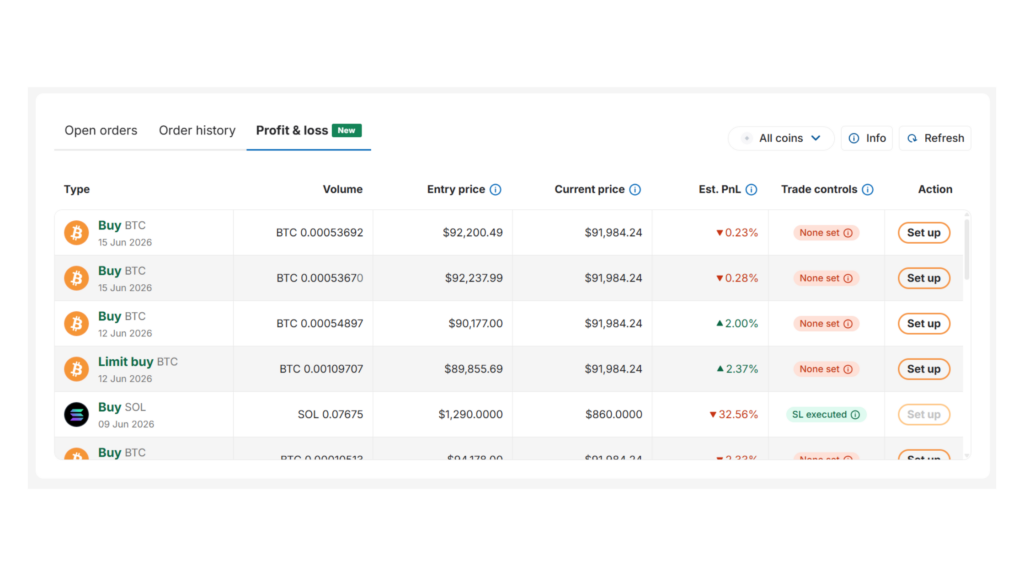
From the trade screen (Profit & loss tab)
If the order does not yet have Take Profit or Stop Loss set:
- Select Set up in the Action column.
- Enter a target price or fiat amount.
- Review the details.
- Select Confirm.
If the order already has Take Profit or Stop Loss set:
- Select Edit in the Action column.
- Update the target price or fiat amount.
- Review the details.
- Select Confirm.
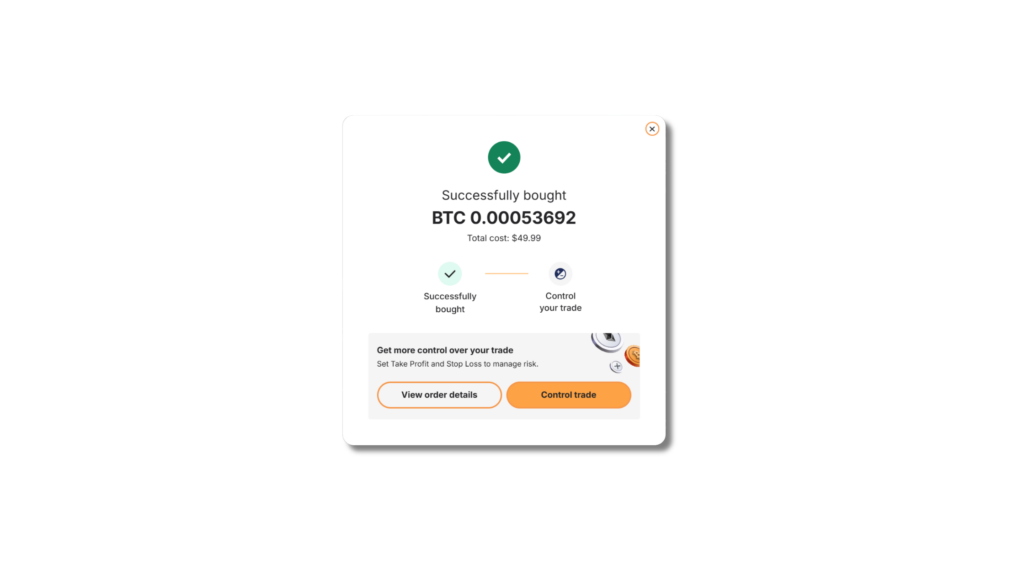
After placing a market order
- Select Control trade on the order confirmation screen.
- Select Take Profit or Stop Loss.
- Enter a target price or fiat amount.
- Review the details.
- Select Confirm.
Frequently asked questions
What happens once Take Profit or Stop Loss triggers?
When Take Profit or Stop Loss triggers, your position closes and settles. Your account balance updates to reflect the result.
If you’ve set both, this operates as an OCO order. As soon as one side fills, the other is cancelled automatically.
For example:
- If your Take Profit order triggers first, your Stop Loss order is cancelled.
- If your Stop Loss order triggers first, your Take Profit order is cancelled.
How Take Profit and Stop Loss differ from limit orders
The key difference is direction:
- Limit orders open a position. They fill when the market reaches the price you set.
- Take Profit and Stop Loss are used to close an existing position. They trigger when the market reaches your exit price, helping you manage risk on positions you already hold.
Will my Take Profit or Stop Loss always trigger?
In normal conditions, yes. These orders are built to fire at the price you set. There are two situations where the actual fill price can differ from your target:
Slippage: in volatile or low-liquidity markets, slippage can cause the price to move past your target before the order fills. The order may still trigger, but at a slightly different price.
Price gaps: if the market jumps past your trigger price, often around major news or periods of high volatility, your order may trigger at a worse price or, in rare cases, not at all.
No order type is fully guaranteed, but in typical conditions, your orders should trigger as expected.
Can I change or cancel a Take Profit or Stop Loss after it’s set?
Yes, you can update or remove either order at any time before it triggers.
- For market or limit buy orders, open the Profit & loss tab at the bottom of the trade screen and select Edit to update or cancel your settings.
- For leveraged positions, open the position details and update your TP/SL settings from there.
Which crypto assets support Take Profit and Stop Loss?
You can set Take Profit and Stop Loss orders for:
- Bitcoin (BTC)
- Ethereum (ETH)
- Solana (SOL)
- Dogecoin (DOGE)
- XRP (XRP)
Are there any fees?
Standard trading fees apply. If you’ve set both a Take Profit and a Stop Loss, you’re only charged for the side that triggers, not both.
Can I set the target by token price or by profit or loss amount?
You can use either method, though the options available depend on where and when you set the order.
- On leveraged positions, you can set a target token price, the fiat profit amount, or the fiat loss amount you’re willing to accept before the position closes.
- For market or limit buy orders, choose a target token price or fiat amount from the trade screen or after placing the trade.
Trade with more control
Take Profit and Stop Loss are straightforward to set up and easy to adjust as your position changes.
bitcoin.com.au supports Take Profit and Stop Loss orders on market buy orders, limit buy orders, and leveraged positions. Set targets by token price, fiat profit amount, or fiat loss amount.
Log in to bitcoin.com.au and add them to your next trade in minutes.